Scenarios
Weighted Round Robin. Here we will configure a GSLB implementation spread amongst three data centres. The primary data centre will have a higher weighting than the other data centres as the GSLB should send more requests there than to anywhere else.
Topology Weighted Round Robin. This configuration will revolve around a workload spread between the UK and Spain. The data centres are in London and Madrid, respectively. The users are located throughout the UK and Spain. We will configure the GSLB to direct each group of users to the data centre in their own country as a priority. If there is an issue with the preferred data centre, requests will be directed to the alternate data centre instead.
Failover Group. The failover group configuration will be a chained failover from primary to secondary and then finally to a tertiary member. We will show that if the primary and secondary nodes become unavailable, requests will be sent to the tertiary. We will then see that if the primary node comes back online it will takeover again.
SDNS (Smart DNS). Whilst configuring the SDNS implementation, we will be doing so for an imagined small object storage cluster. The size of the cluster obviates the need for a full-blown load balancing solution making SDNS more appropriate. The issue with SDNS is that compared to local load balancing it is not able to intelligently direct requests by default. To overcome this issue, we will implement health checking that leverages the power of an " External Dynamic Weight" that we will create.
Scenario Information
The network configuration for all the scenarios that we will investigate is essentially the same. The difference in each of the scenarios is simply the way that GSLB is implemented. Given that this is the case we will first become familiar with the configuration.
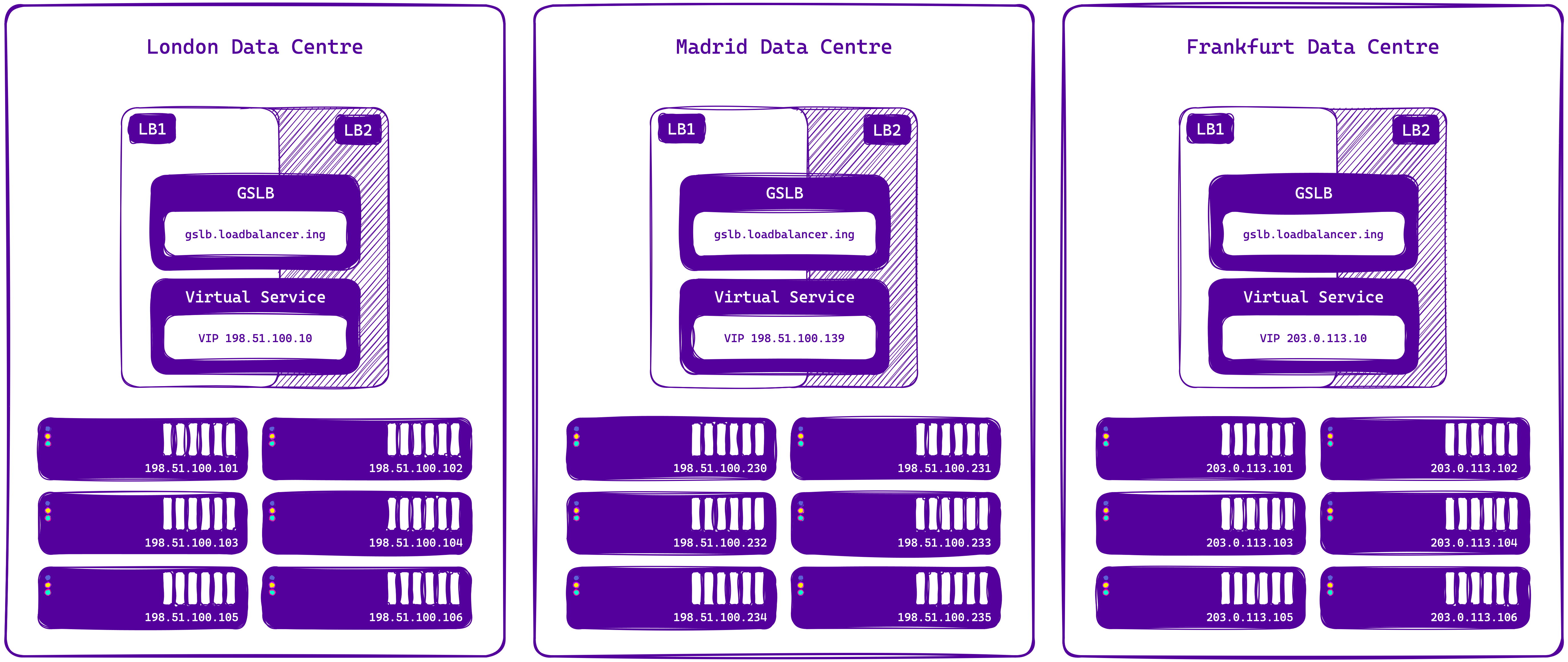
The FQDN
In all the scenarios that we will be going through, the FQDN (global name) will always be gslb.loadbalancer.ing. This simplifies things making it easier to follow as whenever we are talking about the FQDN or global name we are talking about gslb.loadbalancer.ing . In real life scenarios you are likely to require more than one global name. The configuration of multiple global names is the same as a single global name so just keep stacking them up.
Data Centre 1 - London, United Kingdom
Network Range | 198.51.100.0/25 | |
|---|---|---|
Loadbalancer 1 IP | 198.51.100.11 | |
Loadbalancer 1 FQDN | lb1-lon.loadbalancer.ing | |
Loadbalancer 2 IP | 198.51.100.12 | |
Loadbalancer 2 FQDN | lb2-lon.loadbalancer.ing | |
Virtual IP - VIP | 198.51.100.10 | |
Real Servers | #1 | 198.51.100.101 |
#2 | 198.51.100.102 | |
#3 | 198.51.100.103 | |
#4 | 198.51.100.104 | |
#5 | 198.51.100.105 | |
#6 | 198.51.100.106 | |
User Range | 172.31.0.0/24 | |
Data Centre 2 - Madrid, Spain
Network Range | 198.51.100.128/25 | |
|---|---|---|
Loadbalancer 1 IP | 198.51.100.141 | |
Loadbalancer 1 FQDN | lb1-mad.loadbalancer.ing | |
Loadbalancer 2 IP | 198.51.100.142 | |
Loadbalancer 2 FQDN | lb2-mad.loadbalancer.ing | |
Virtual IP - VIP | 198.51.100.139 | |
Real Servers | #1 | 198.51.100.230 |
#2 | 198.51.100.231 | |
#3 | 198.51.100.232 | |
#4 | 198.51.100.233 | |
#5 | 198.51.100.234 | |
#6 | 198.51.100.235 | |
User Range | 172.31.64.0/24 | |
Data Centre 3 - Frankfurt, Germany
Network Range | 203.0.113.0/25 | |
|---|---|---|
Loadbalancer 1 IP | 203.0.113.11 | |
Loadbalancer 1 FQDN | lb1-frk.loadbalancer.ing | |
Loadbalancer 2 IP | 203.0.113.12 | |
Loadbalancer 2 FQDN | lb2-frk.loadbalancer.ing | |
Virtual IP - VIP | 203.0.113.10 | |
Real Servers | #1 | 203.0.113.101 |
#2 | 203.0.113.102 | |
#3 | 203.0.113.103 | |
#4 | 203.0.113.104 | |
#5 | 203.0.113.105 | |
#6 | 203.0.113.106 | |
User Range | 172.31.128.0/24 | |
Network Ranges
Location | CIDR Notation |
|---|---|
London Data Centre | 198.51.100.0/25 |
172.31.0.0/24 | |
Madrid Data Centre | 198.51.100.0/25 |
172.31.64.0/24 | |
Frankfurt Data Centre | 203.0.113.0/25 |
172.31.128.0/24 |